Skills are modular pipeline files that automatically activate based on project context. A Go skill can provide go:build
, go:test
, and go:lint
jobs that appear only when go.mod
exists in your project. Skills let you build a library of reusable workflows that work across projects without copying configuration.
Skill Locations
Skills are YAML pipeline files stored in special directories:
.atkins/skills/- Project-local skills$HOME/.atkins/skills/- Global skills (shared across all projects)
Each skill file becomes a namespace. For example, go.yml
creates jobs like go:build
, go:test
.
Project Skills
  myproject/
├── .atkins/
│   └── skills/
│       ├── go.yml        → go:*
│       ├── docker.yml    → docker:*
│       └── deploy.yml    → deploy:*
└── atkins.yml
Global Skills
  $HOME/
└── .atkins/
    └── skills/
        ├── go.yml        → Available in all projects
        └── node.yml      → Available in all projects
Project skills take precedence over global skills with the same name.
Creating a Skill
Skills are YAML pipeline files with a when:
block for conditional activation:
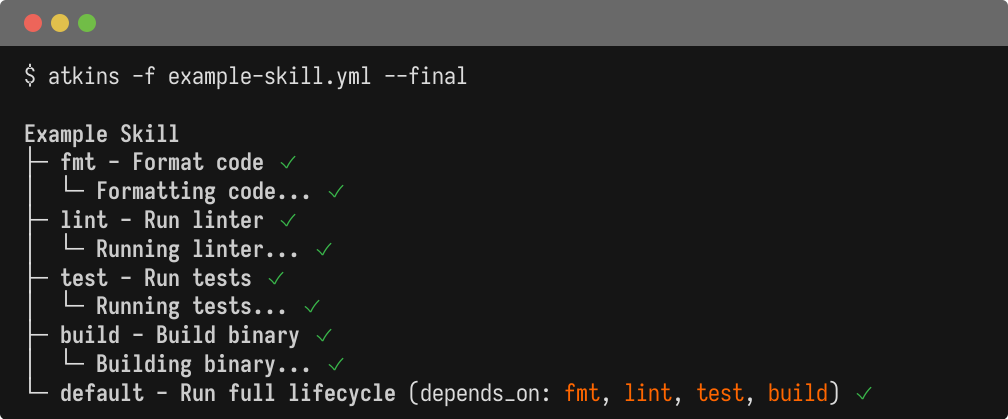
  name: Example Skill

jobs:
  default:
    desc: Run full lifecycle
    depends_on: [fmt, lint, test, build]

  fmt:
    desc: Format code
    steps:
      - run: echo "Formatting code..."

  lint:
    desc: Run linter
    steps:
      - run: echo "Running linter..."

  test:
    desc: Run tests
    aliases: [test]
    steps:
      - run: echo "Running tests..."

  build:
    desc: Build binary
    aliases: [build]
    steps:
      - run: echo "Building binary..."
  name: Conditional Skill Activation

# This skill activates when any of these files exist
when:
  files:
    - go.mod
    - package.json

jobs:
  default:
    desc: Project lifecycle
    depends_on: [lint, test, build]

  lint:
    steps:
      - run: echo "Running project linter..."

  test:
    steps:
      - run: echo "Running project tests..."

  build:
    steps:
      - run: echo "Building project..."
The when:
block controls when a skill is available. Multiple files use OR logic - any match activates the skill. File patterns search upward from the current directory.
Skill Namespacing
Skills automatically namespace their jobs:
go.yml creates:
go:defaultgo:buildgo:test
Access them with:
  atkins go:build
atkins go:test
Aliases
Skills can provide global aliases that map to namespaced jobs:
  jobs:
  build:
    aliases: [build, b]
    steps:
      - run: go build
Now atkins build
invokes go:build
.
Alias Conflicts
If multiple skills define the same alias, the first-loaded wins (project before global).
To target explicitly:
  atkins :go:build      # Explicit skill reference
atkins :docker:build  # Different skill
Default Jobs
A skill can have a default
job, enabling shorthand invocation:
  jobs:
  default:
    depends_on: [lint, test, build]
atkins go # Runs go:default
Cross-Skill References
Skills can reference each other using :skill:job
syntax:
release.yml:
  jobs:
  release:
    steps:
      - task: :go:test
      - task: :go:build
      - task: :docker:build
      - task: :docker:push
Skill Variables
Skills have their own variable scope:
  name: Docker Skill

vars:
  image: myapp
  registry: docker.io

jobs:
  build:
    steps:
      - run: docker build -t ${{ registry }}/${{ image }} .
Example Skills
Go Skill
  name: Go build and test
when:
  files: [go.mod]

vars:
  binary: $(basename $(pwd))

jobs:
  default:
    depends_on: [generate, fmt, lint, test, build]

  generate:
    steps:
      - run: go generate ./...

  fmt:
    steps:
      - run: gofmt -w .
      - run: goimports -w .

  lint:
    steps:
      - run: golangci-lint run

  test:
    aliases: [test]
    steps:
      - run: go test ./...

  build:
    aliases: [build]
    steps:
      - run: go build -o bin/${{ binary }} ./...
Docker Skill
  name: Docker build and push
when:
  files: [Dockerfile]

vars:
  image: $(basename $(pwd))
  tag: $(git describe --tags --always)

jobs:
  build:
    aliases: [docker]
    steps:
      - run: docker build -t ${{ image }}:${{ tag }} .

  push:
    steps:
      - run: docker push ${{ image }}:${{ tag }}
Node.js Skill
  name: Node.js
when:
  files: [package.json]

jobs:
  install:
    steps:
      - run: npm install

  build:
    depends_on: [install]
    steps:
      - run: npm run build

  test:
    depends_on: [install]
    aliases: [test]
    steps:
      - run: npm test
Workspace Skills
A workspace skill in [project]/.atkins/skills/
applies to the entire project.
With when:
- working directory is set to the folder containing the matched file.
Without when:
- working directory is set to the folder containing .atkins/
. This allows the skill to run project-level commands from the workspace root.
Global Skill Behavior
Global skills in ~/.atkins/skills/
are available everywhere without populating your source tree.
Global skills do not change the working directory. They run from wherever you invoke atkins, unless:
- They have a
when:that matches a file (uses that file's folder) - They explicitly set
dir:in the pipeline
Project Structure
The main pipeline and .atkins/
folder define workspace boundaries:
  /project/.atkins/          # workspace skills
/project/atkins.yml        # main pipeline
/project/app/compose.yml   # matched by compose skill
/project/app/sub/          # can invoke skills from here
From /project/app/sub/
, atkins searches upward to find configuration and skills. A compose skill with when: files: [compose.yml]
would match /project/app/compose.yml
and run from /project/app/
.
Nested .atkins/
folders or pipelines create separate workspaces with their own scope.
Jail Mode
To disable global skills:
atkins --jail
This only loads skills from .atkins/skills/
, ignoring $HOME/.atkins/skills/
.
Useful for:
- Reproducible CI builds
- Avoiding personal customizations
- Testing project-only configurations
Listing Skills
View all active skills and their jobs:
atkins -l
Output shows skills after the main pipeline:
  My Project

* default:    Run all
* build:      Build app

Aliases

* go:         (invokes: go:default)
* test:       (invokes: go:test)

Go build and test

* go:default: Go lifecycle
* go:build:   Build binary
* go:test:    Run tests
See Also
- Configuration - Pipeline format details
- Job Targeting - Running specific jobs