Atkins is a command runner that works the same way on your laptop and in CI. It emphasizes simplicity and YAML-friendly syntax. Atkins runs tasks locally and in automation, and can attach to its own CI/CD server to distribute those runs across agents. It is not a hosted CI platform: there are no managed runners, no marketplace and no secrets vault.
When to Choose Atkins
Atkins suits projects where:
- Commands should inherit the full shell environment automatically. Variables set in one step are available in the next without extra configuration.
- Secrets are handled externally. Atkins has no built-in secrets management; use your environment or a dedicated tool.
- YAML files shouldn't need excessive quoting. The
${{ }}syntax works naturally in YAML and won't collide with bash${var}constructs. - A small, standalone binary matters. Atkins ships as a single ~10MB binary with no runtime dependencies.
- Local and CI runs should behave identically. Write a pipeline once and run it the same way everywhere.
- Jobs run in parallel with visible progress. Use
detach: trueto run jobs concurrently; the tree view shows what's happening. - Pipelines should be modular and reusable. Skills let you compose and conditionally activate groups of jobs across projects.
- Work should spread across your own machines.
atkins --loginattaches a machine to a CI/CD server; runs are recorded as jobs and agents claim them from a shared queue.
Examples
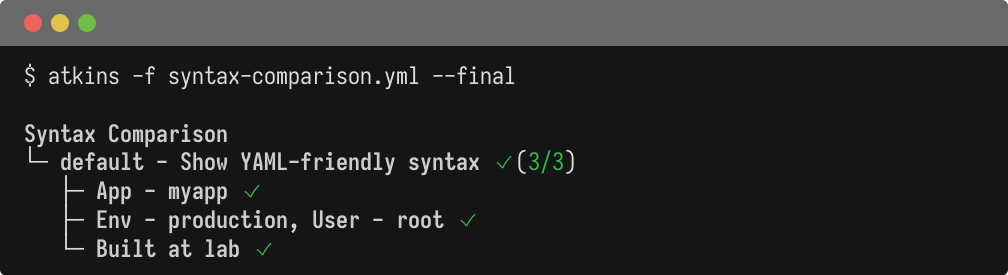
YAML-Friendly Syntax
The ${{ }}
syntax works naturally in YAML without quoting, and mixes cleanly with bash variables:
  name: Syntax Comparison

vars:
  app_name: myapp
  env: production

tasks:
  default:
    desc: Show YAML-friendly syntax
    steps:
      - name: No quoting needed
        run: echo "App - ${{ app_name }}"
      - name: Mix with bash variables
        run: echo "Env - ${{ env }}, User - $USER"
      - name: Shell substitution
        run: echo "Built at $(uname -n)"
Environment Inheritance
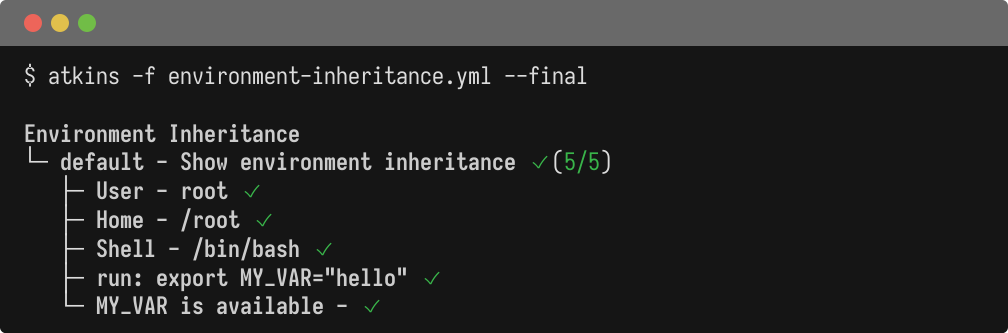
Commands inherit the full shell environment automatically:
  name: Environment Inheritance

tasks:
  default:
    desc: Show environment inheritance
    steps:
      - name: Access USER
        run: echo "User - $USER"
      - name: Access HOME
        run: echo "Home - $HOME"
      - name: Access SHELL
        run: echo "Shell - $SHELL"
      - name: Set variable
        run: export MY_VAR="hello"
      - name: Use variable
        run: echo "MY_VAR is available - $MY_VAR"
Parallel Execution
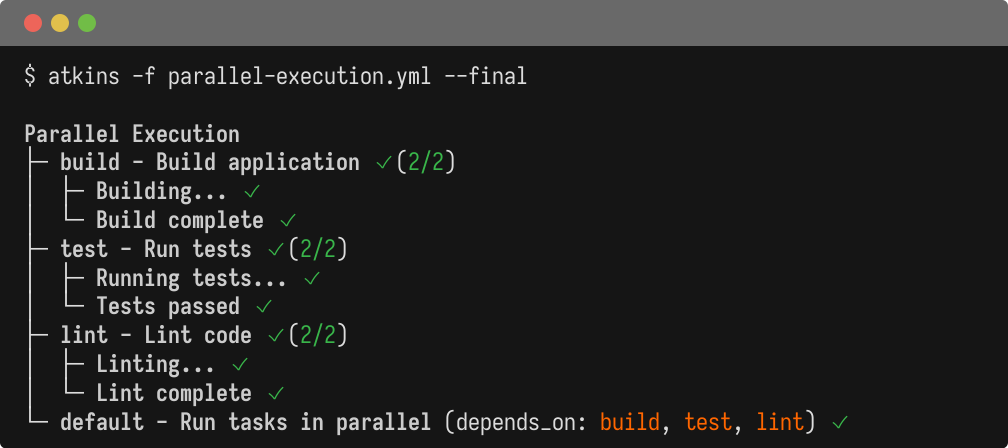
Run jobs concurrently with detach: true
and see progress in the tree view:
  name: Parallel Execution

tasks:
  default:
    desc: Run tasks in parallel
    depends_on: [build, test, lint]

  build:
    desc: Build application
    detach: true
    steps:
      - run: echo "Building..."
      - run: echo "Build complete"

  test:
    desc: Run tests
    detach: true
    steps:
      - run: echo "Running tests..."
      - run: echo "Tests passed"

  lint:
    desc: Lint code
    detach: true
    steps:
      - run: echo "Linting..."
      - run: echo "Lint complete"
Comparison Table
| Feature | Atkins | GitHub Actions | Taskfile | Lefthook |
|---|---|---|---|---|
| Primary use case | Local dev + CI runner | CI/CD platform | Task runner | Git hooks |
| Distributed execution | Yes (self-hosted) 1 | Yes 2 | No 3 | No 4 |
| Variable interpolation | ${{ var }}
5
|
${{ env.VAR }}
6
|
{{.Var}}
(Go templates)
7
|
N/A 8 |
| Shell exec interpolation | $(cmd)
9
|
N/A 10 | sh: cmd
11
|
N/A 12 |
| Secrets management | No | Yes (encrypted) 13 | No 14 | No |
| Environment inheritance | Full 15 | Explicit 16 | Partial 17 | Full |
| Parallel execution | Yes (detach: true
)
18
|
Yes (jobs) 19 | Yes (--parallel
)
20
|
Yes (parallel hooks) 21 |
| Conditional execution | if:
(expr-lang)
22
|
if:
(expressions)
23
|
preconditions:
24
|
skip
patterns
25
|
| File discovery | Auto-discovers config 26 | Fixed .github/workflows/
27
|
Taskfile.yml
28
|
.lefthook.yml
29
|
| Dependencies | depends_on: |
needs: |
deps: |
N/A |
| Plugin/extension system | Skills 30 | Actions marketplace 31 | Includes 32 | N/A |
| Output formats | Tree, JSON, YAML | Logs | Text | Text |
| Binary size | ~10MB | N/A (cloud) | ~15MB | ~5MB |
| Shebang support | Yes | No | No | No |
| Stdin pipeline | Yes | No | Yes | No |
See Also
- Introduction - Overview and quick start
- Migrating to Atkins - Migration guides
References
Runs locally by default;
atkins serverqueues jobs for agents you host↩︎YAML-compatible, no quoting needed↩︎
Go template syntax, requires quoting in YAML↩︎
Lefthook uses shell environment variables directly↩︎
Bash-compatible subshell execution within YAML↩︎
Use
run:step output instead↩︎Uses shell directly↩︎
Relies on environment or external secret management↩︎
Commands inherit full shell environment automatically↩︎
Via
detach: trueon jobs or steps↩︎Uses expr-lang.org for condition evaluation↩︎
Searches
.atkins.yml,atkins.ymland parent directories↩︎Fixed directory structure in repository↩︎
Modular pipeline components with conditional activation↩︎