When you have multiple jobs and skills, Atkins provides flexible syntax for targeting exactly which job to run. You can target jobs by name, by skill namespace, or by alias. Understanding the resolution order helps when job names overlap.
Basic Targeting
Run by Name
  # Run a job by its name
atkins build

# Run multiple jobs in sequence
atkins lint test build
Namespaced Jobs
Jobs from skills use skill:job
syntax:
  # Run 'test' job from 'go' skill
atkins go:test

# Run 'build' job from 'docker' skill
atkins docker:build
The Default Job
When running atkins
without arguments:
- Looks for a job named
default - Falls back to a job with
defaultin its aliases
  jobs:
  all:
    aliases: [default]
    depends_on: [lint, test, build]
If no default is found, Atkins shows available jobs:
  atkins: Available jobs for this project:
* build:       Build the application
* test:        Run tests
atkins: Job "default" does not exist
Invoked Pipeline (:
Prefix)
The :
prefix directly invokes a job, bypassing alias resolution.
Invoke Main Pipeline Job
  # Invoke 'build' in main pipeline (bypasses aliases)
atkins :build
Use this when:
- A skill has aliased
buildbut you want the main pipeline'sbuild - You want to skip alias resolution entirely
Invoke Skill Pipeline Job
  # Invoke 'build' job in 'go' skill
atkins :go:build

# Invoke 'test' job in 'docker' skill
atkins :docker:test
Cross-Pipeline Task References
Within a pipeline, steps can reference tasks from other pipelines using :
syntax.
Reference Main Pipeline
  # In a skill pipeline
jobs:
  deploy:
    steps:
      # Call 'build' from main pipeline
      - task: :build
      - run: echo "Deploying..."
Reference Other Skills
  # In release skill
jobs:
  release:
    steps:
      # Call tasks from other skills
      - task: :go:build
      - task: :docker:build
      - task: :docker:push
Example: Multi-Skill Coordination
Main pipeline (atkins.yml):
  name: My App

jobs:
  build:
    steps:
      - run: go build -o app

  deploy:
    steps:
      - task: :go:test      # From go skill
      - task: :docker:build  # From docker skill
      - run: kubectl apply -f k8s/
Go skill (.atkins/skills/go.yml):
  name: Go Skill
when:
  files: [go.mod]

jobs:
  test:
    steps:
      - run: go test ./...
Docker skill (.atkins/skills/docker.yml):
  name: Docker Skill
when:
  files: [Dockerfile]

jobs:
  build:
    steps:
      - run: docker build -t app .
Aliases
Jobs can have alternative names:
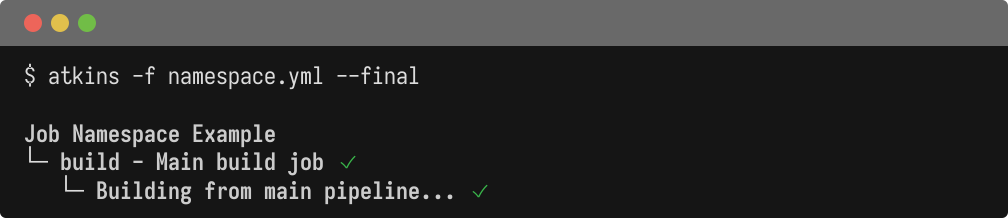
  name: Job Namespace Example

jobs:
  build:
    aliases: [default]
    desc: Main build job
    steps:
      - run: echo "Building from main pipeline..."

  test:
    desc: Main test job
    steps:
      - run: echo "Testing from main pipeline..."

  deploy:
    desc: Deploy using skill jobs
    steps:
      # Reference jobs from other skills using :skill:job syntax
      - task: :build
      - run: echo "Deploying application..."
  name: Job Aliases Example

jobs:
  docker_build:
    desc: Build Docker image
    aliases: [build, b, db]
    steps:
      - run: echo "Building Docker image..."

  docker_push:
    desc: Push Docker image
    aliases: [push, p]
    steps:
      - run: echo "Pushing Docker image..."

  all:
    desc: Build and push
    aliases: [default]
    depends_on: [docker_build, docker_push]
Now all of these work:
  atkins docker:build  # Full name
atkins build         # Alias
atkins b             # Short alias
atkins db            # Another alias
Job Resolution Order
When you invoke atkins <name>
, resolution follows this precedence:
- Invoked pipeline
(
:prefix) - directly invoke job, bypassing aliases - Main pipeline exact match - job name matches exactly in main pipeline
- Main pipeline alias - alias matches in main pipeline
- Skills exact match - job name matches in a skill pipeline
- Prefixed job
(
skill:jobsyntax) - explicit skill targeting - Skills alias - alias matches in a skill pipeline
- Fuzzy match - substring/suffix match (single match only)
If no match is found, Atkins returns an error.
Main pipeline jobs and aliases take precedence over skills. If your main pipeline has a job with aliases: [default]
, running atkins default
will invoke it even if a skill has a job literally named default
.
Fuzzy Matching
If no exact match is found, Atkins tries fuzzy matching:
  # If 'docker:build' exists
atkins build  # Matches via suffix
When multiple matches exist:
  INFO: found 2 matching jobs:

  - go:build
  - docker:build
Use the full name or :
prefix to disambiguate.
Jobs Named Like a Namespace
A :
in a job's own name has no special meaning to job resolution; it is matched as an exact key in the job map, the same as a name with no colon in it:
  jobs:
  build:
    steps:
      - task: build:linux
      - task: build:darwin

  build:linux:
    steps:
      - run: GOOS=linux go build

  build:darwin:
    steps:
      - run: GOOS=darwin go build
  atkins build         # Runs build:linux and build:darwin
atkins build:linux   # Also runs directly
Naming one directly, as above, runs it like any other job; -l
lists it like any other job too.
Examples
Common Invocations
  # Run default job
atkins

# Run specific job from main pipeline
atkins test
atkins up

# Run skill job (explicit)
atkins go:lint
atkins docker:build
Invoked Pipeline (:
prefix)
  # Invoke main pipeline job (bypasses aliases)
atkins :up
atkins :build

# Invoke skill job directly
atkins :go:build
atkins :docker:push
When to Use :
Prefix
Use the :
prefix when:
- You want to bypass alias resolution
- A skill has aliased a common name you want to skip
  # Main pipeline has 'up' job, runs via exact match
atkins up

# Bypass aliases and invoke main pipeline 'up' directly
atkins :up
Full Example
  # Run default job
atkins

# Run 'build' from main pipeline
atkins build

# Run 'test' from go skill
atkins go:test

# Run 'up' from main pipeline (explicit)
atkins :up

# Run 'build' from docker skill (explicit)
atkins :docker:build

# Using alias (if 'b' is alias for build)
atkins b

# With file flag
atkins -f ci/test.yml integration