Skills are modular pipeline files that automatically activate based on project context. A Go skill can provide go:build
, go:test
, and go:lint
jobs that appear only when go.mod
exists in your project. Skills let you build a library of reusable workflows that work across projects without copying configuration.
Skill Locations
Skills are YAML pipeline files stored in special directories:
.atkins/skills/- Project-local skills$HOME/.atkins/skills/- Global skills (shared across all projects)
Each skill file becomes a namespace. For example, go.yml
creates jobs like go:build
, go:test
.
Project Skills
  myproject/
├── .atkins/
│   └── skills/
│       ├── go.yml        (go:*)
│       ├── docker.yml    (docker:*)
│       └── deploy.yml    (deploy:*)
└── atkins.yml
Global Skills
  $HOME/
└── .atkins/
    └── skills/
        ├── go.yml        (available in all projects)
        └── node.yml      (available in all projects)
Project skills take precedence over global skills with the same name.
Creating a Skill
Skills are YAML pipeline files with a when:
block for conditional activation:
  name: Example Skill

jobs:
  default:
    desc: Run full lifecycle
    depends_on: [fmt, lint, test, build]

  fmt:
    desc: Format code
    steps:
      - run: echo "Formatting code..."

  lint:
    desc: Run linter
    steps:
      - run: echo "Running linter..."

  test:
    desc: Run tests
    aliases: [test]
    steps:
      - run: echo "Running tests..."

  build:
    desc: Build binary
    aliases: [build]
    steps:
      - run: echo "Building binary..."
  name: Conditional Skill Activation

# This skill activates when any of these files exist
when:
  files:
    - go.mod
    - package.json

jobs:
  default:
    desc: Project lifecycle
    depends_on: [lint, test, build]

  lint:
    steps:
      - run: echo "Running project linter..."

  test:
    steps:
      - run: echo "Running project tests..."

  build:
    steps:
      - run: echo "Building project..."
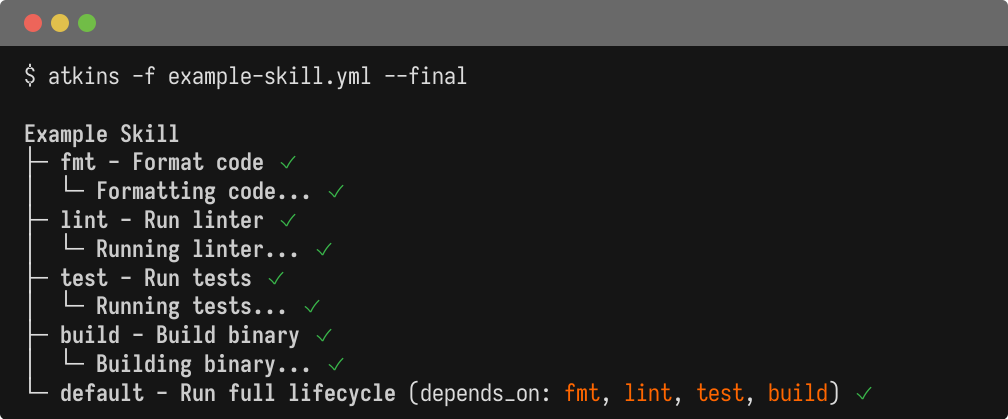
The when:
block controls when a skill is available. Multiple files use OR logic - any match activates the skill. File patterns search upward from the current directory.
A pattern carrying *
, ?
or [...]
is expanded as a glob, so a skill can activate on what a folder holds rather than on its name:
  when:
  files:
    - schema/*.up.sql    # a folder of migrations, not any folder called schema
Skill Help
A skill says what it is for with help:
, one or two sentences naming the files it reads and writes. atkins --help
prints it beside the skill and the jobs decoded from the YAML.
  name: Go build and test
help: >-
  Generates, formats, lints, tests and builds a Go module. go:test writes the
  coverage profile pkg.cov; go:build writes bin/<name>-<goos>-<goarch>.
A skill may also carry a markdown file of the same base name beside it, go.md
next to go.yml
. It is an optional usage guide for a skill whose typical use is not obvious from the job list, and atkins --help
prints it under the skill. It documents typical use, not every job: the job list is already decoded from the YAML.
  `atkins go` runs the whole lifecycle: generate, fmt, lint, test, build.

- `atkins go:fmt` - format the sources.
- `atkins go:test` - run the tests and write the coverage profile `pkg.cov`.
--vendor
copies the companion along with the skill file, and a change to the companion alone is enough to report the vendored skill as out of date.
Skill Namespacing
Skills automatically namespace their jobs:
go.yml creates:
go:defaultgo:buildgo:test
Access them with:
  atkins go:build
atkins go:test
Aliases
Skills can provide global aliases that map to namespaced jobs:
  jobs:
  build:
    aliases: [build, b]
    steps:
      - run: go build
Now atkins build
invokes go:build
.
Alias Conflicts
Explicit job aliases take precedence over auto-generated aliases. For example, if a job has aliases: [go]
, it overrides the automatic go
to go:default
mapping.
When multiple skills define the same explicit alias, project skills win over global skills.
To target explicitly:
  atkins :go:build      # Explicit skill reference
atkins :docker:build  # Different skill
Default Jobs
A skill can have a default
job, enabling shorthand invocation:
  jobs:
  default:
    depends_on: [lint, test, build]
atkins go # Runs go:default
Cross-Skill References
Skills can reference each other using :skill:job
syntax:
release.yml:
  jobs:
  release:
    steps:
      - task: :go:test
      - task: :go:build
      - task: :docker:build
      - task: :docker:push
Skill Variables
Skills can define vars:
at the pipeline level or job level. These variables are available to all jobs within the skill:
  name: Docker Skill

vars:
  image: myapp
  registry: docker.io

jobs:
  build:
    steps:
      - run: docker build -t ${{ registry }}/${{ image }} .
Skill Variable Evaluation
When a skill is invoked from another pipeline (e.g., task: docker:build
), the caller's variable stack carries to the skill. As the execution context already contains name
, the skill's definition for it is ignored. This allows parameters to come from the execution context, without needing to handle default values when such parameters are omitted in other execution paths.
  # Caller pipeline (atkins.yml)
vars:
  name: myapp
  semver: v2.0.0

jobs:
  deploy:
    steps:
      - task: docker:build
  # Skill (~/.atkins/skills/docker.yml)
vars:
  name: $(basename $(realpath -s .))    # ignored, caller provides "name"
  semver: $(git tag ... | tail -n 1)    # ignored, caller provides "semver"
  image: titpetric/${{ name }}           # added, resolves to "titpetric/myapp"
Example Skills
Go Skill
  name: Go build and test
when:
  files: [go.mod]

vars:
  binary: $(basename $(pwd))

jobs:
  default:
    depends_on: [generate, fmt, lint, test, build]

  generate:
    steps:
      - run: go generate ./...

  fmt:
    steps:
      - run: gofmt -w .
      - run: splint fix ./...

  lint:
    steps:
      - run: golangci-lint run

  test:
    aliases: [test]
    steps:
      - run: go test ./...

  build:
    aliases: [build]
    steps:
      - run: go build -o bin/${{ binary }} ./...
Docker Skill
  name: Docker build and push
when:
  files: [Dockerfile]

vars:
  image: $(basename $(pwd))
  tag: $(git describe --tags --always)

jobs:
  build:
    aliases: [docker]
    steps:
      - run: docker build -t ${{ image }}:${{ tag }} .

  push:
    steps:
      - run: docker push ${{ image }}:${{ tag }}
Node.js Skill
  name: Node.js
when:
  files: [package.json]

jobs:
  install:
    steps:
      - run: npm install

  build:
    depends_on: [install]
    steps:
      - run: npm run build

  test:
    depends_on: [install]
    aliases: [test]
    steps:
      - run: npm test
Workspace Skills
A workspace skill in [project]/.atkins/skills/
applies to the entire project.
With when:
- working directory is set to the folder containing the matched file.
Without when:
- working directory is set to the folder containing .atkins/
. This allows the skill to run project-level commands from the workspace root.
Global Skill Behavior
Global skills in ~/.atkins/skills/
are available everywhere without populating your source tree.
Global skills do not change the working directory. They run from wherever you invoke atkins, unless:
- They have a
when:that matches a file (uses that file's folder) - They explicitly set
dir:in the pipeline
Project Structure
The main pipeline and .atkins/
folder define workspace boundaries:
  /project/.atkins/          # workspace skills
/project/atkins.yml        # main pipeline
/project/app/compose.yml   # matched by compose skill
/project/app/sub/          # can invoke skills from here
From /project/app/sub/
, atkins searches upward to find configuration and skills. A compose skill with when: files: [compose.yml]
would match /project/app/compose.yml
and run from /project/app/
.
Nested .atkins/
folders or pipelines create separate workspaces with their own scope.
Jail Mode
To disable global skills:
atkins --jail
This only loads skills from .atkins/skills/
, ignoring $HOME/.atkins/skills/
.
Useful for:
- Reproducible CI builds
- Avoiding personal customizations
- Testing project-only configurations
Vendoring
Global skills live on one machine. A pipeline that leans on ~/.atkins/skills/compose.yml
runs on the laptop it was written on and fails on a clean clone, and a CI agent is exactly the machine with no personal skills directory.
--vendor
reports the skills a repository uses and what copying them would change:
atkins --vendor
  Found 7 local skills.
Found usage for 3 skills.
  + docker  +45 -0 (new)
  ✓ go      (up to date)
  ~ mdox    +4 -1 (changed)
Would install: docker, mdox.
Run atkins --vendor --write to write them.
A skill already vendored unchanged gets a checkmark; one that would be created or overwritten gets the lines the write adds and removes. --debug
adds the reason each skill was selected, and the diff behind the counts.
Nothing is written until --write
:
atkins --vendor --write
  Found 7 local skills.
Found usage for 3 skills.
  + docker  +45 -0 (new)
  ✓ go      (up to date)
  ~ mdox    +4 -1 (changed)
Installed: docker, mdox.
Skills are written to .atkins/skills/
next to .git
, so they apply to the whole repository, and the folder is created if it doesn't exist yet. The copies are ordinary repository content: commit them like any other dependency, and an update is a re-run and a diff.
A vendored copy that has drifted from its source is overwritten. Skills are tracked files, so reverting a change you wanted to keep is git checkout
— which is why the dry run shows the diff first.
Selection Rules
A skill is vendored when any of these hold:
- Its
when:block matches a path anywhere in the repository. The search descends the tree rather than climbing it, so aschema/*.up.sqlfile in a submodule selects the schema skill, the same way it activates there. - It has no
when:block, which makes it active everywhere. - A pipeline in the repository names one of its jobs through
task:ordepends_on:. A reference todocker:buildselects the docker skill even without adocker/Dockerfile. - A skill already selected names one of its jobs. A release skill calling
:docker:buildbrings the docker skill with it.
Dot directories and node_modules
, vendor
, testdata
, bin
, dist
and coverage
are not descended into.
--vendor
cannot be combined with --jail
, which excludes the $HOME/.atkins/skills
that vendoring reads from.
Listing Skills
View all active skills and their jobs:
atkins -l
Output shows skills after the main pipeline:
  My Project

* default:    Run all
* build:      Build app

Aliases

* go:         (invokes: go:default)
* test:       (invokes: go:test)

Go build and test

* go:default: Go lifecycle
* go:build:   Build binary
* go:test:    Run tests
See Also
- Configuration - Pipeline format details
- Job Targeting - Running specific jobs