Atkins pipelines are defined in YAML files, typically named atkins.yml
or .atkins.yml
. A pipeline contains jobs (or tasks), each with a sequence of steps to execute. Atkins supports two syntax styles (Taskfile-compatible and GitHub Actions-inspired) which can be mixed in the same file.
Basic Structure
A minimal pipeline file:
  name: My Project

jobs:
  default:
    desc: Run everything
    steps:
      - run: echo "Hello, world!"
Syntax Flavors
Atkins supports two syntax styles. Both can be used interchangeably within the same file.
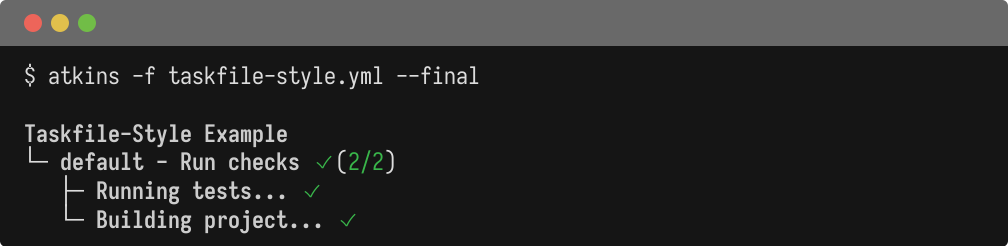
  name: Taskfile-Style Example

tasks:
  default:
    desc: Run checks
    cmds:
      - echo "Running tests..."
      - echo "Building project..."

  up: echo "Starting services..."
  down: echo "Stopping services..."
  ps: echo "Listing services..."
  logs: echo "Showing logs..."

  build:
    cmd: echo "Building single command..."

  deploy:
    cmds:
      - echo "Building artifact..."
      - echo "Deploying to server..."
  name: GHA-Style Example

jobs:
  default:
    desc: Build and test
    depends_on: [lint, test]
    steps:
      - name: Build
        run: echo "Building application..."

  lint:
    steps:
      - run: echo "Running linter..."

  test:
    steps:
      - run: echo "Running tests..."
Variable Interpolation
Atkins uses ${{ expr }}
for variable interpolation. This syntax avoids conflicts with bash $VAR
and ${var}
. Atkins resolves ${{ }}
first, then passes the command to the shell which handles $VAR
and ${VAR}
. Both can coexist without escaping. Shell command output can fill variable values using $(command)
syntax in vars:
, env:
, and inline values.
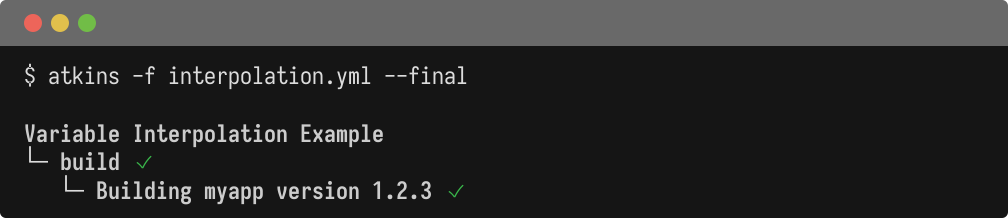
  name: Variable Interpolation Example

vars:
  binary: myapp
  app_name: myservice
  version: 1.2.3
  platforms:
    - linux
    - darwin
  build:
    goarch: [arm64, amd64]

jobs:
  build:
    aliases: [default]
    steps:
      - run: echo "Building ${{ binary }} version ${{ version }}"

  info:
    vars:
      output_dir: bin
    steps:
      - run: echo "Output to ${{ output_dir }}/${{ app_name }}"

  compile:
    steps:
      - for: goarch in ${{ build.goarch }}
        run: echo "Compiling for GOARCH=${{ goarch }}"
Environment (env:
)
The env:
block sets environment variables. It can appear at the pipeline, job, or step level.
  env:
  vars:
    GIT_COMMIT: $(git rev-parse HEAD)
    GIT_BRANCH: $(git rev-parse --abbrev-ref HEAD)

jobs:
  build:
    steps:
      - run: echo "Commit is $GIT_COMMIT on $GIT_BRANCH"
Step-level environment overrides:
  jobs:
  install:
    steps:
      - env:
          vars:
            CGO_ENABLED: 0
            GOOS: linux
            GOARCH: amd64
        run: go build -o bin/app .
Environment Inheritance
Atkins passes the existing shell environment through to all commands. There's no need to explicitly declare which variables to pass. Everything is inherited automatically. This differs from tools like Taskfile that require explicit environment declarations.
Include (include:
)
Compose pipelines from multiple files using include:
at the pipeline level:
  name: My Project

include: ci/*.yml

jobs:
  default:
    steps:
      - run: echo "Jobs from included files are available"
Each included file contributes its jobs to the pipeline, allowing large pipelines to be split into manageable pieces.
Conditional Activation (when:
)
The when:
block controls when a skill activates based on project context. This is primarily used in skill files
.
  name: Go build and test

when:
  files:
    - go.mod

jobs:
  test:
    steps:
      - run: go test ./...
The skill activates only when go.mod
exists. Multiple files use OR logic. Any match activates the skill. See Skills
for details.
Complete Example
  #!/usr/bin/env atkins
name: My App

env:
  vars:
    GIT_COMMIT: $(git rev-parse HEAD)
    GIT_TAG: $(git describe --tags --always)

vars:
  binary: myapp
  platforms:
    - amd64
    - arm64

jobs:
  default:
    desc: Run everything
    depends_on: fmt
    steps:
      - task: test
      - task: build

  fmt:
    desc: Format code
    steps:
      - run: gofmt -w .
      - run: go mod tidy

  test:
    desc: Run tests
    steps:
      - run: go test ./...

  build:
    desc: Cross-compile
    steps:
      - for: arch in platforms
        env:
          vars:
            CGO_ENABLED: 0
            GOARCH: ${{ arch }}
        run: go build -ldflags="-X 'main.Commit=${GIT_COMMIT}'" -o bin/${{ binary }}-${{ arch }} .
See Also
- Pipelines - Pipeline-level configuration
- Jobs - Job configuration and dependencies
- Steps - Step configuration and loops
- CLI Flags - Command-line options
- Job Targeting - Running specific jobs